> For the complete documentation index, see [llms.txt](https://nexvision-lab.gitbook.io/nexvision-lab-documents/llms.txt). Markdown versions of documentation pages are available by appending `.md` to page URLs; this page is available as [Markdown](https://nexvision-lab.gitbook.io/nexvision-lab-documents/getting-started/nexvision-saas/osint-360/company-search.md).
# Company Search
## Step 1: Select Company Search
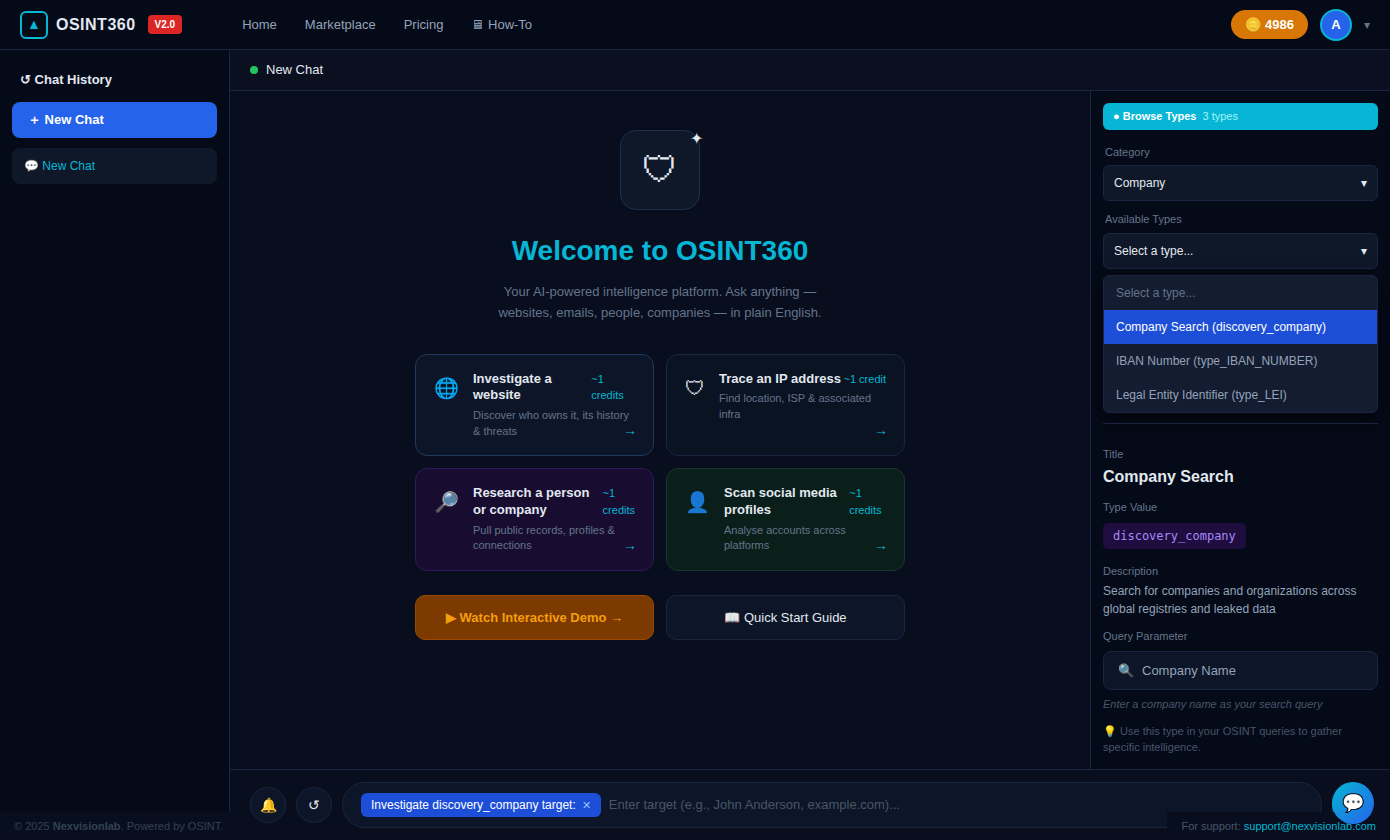
Open the **Investigation Types** panel from the right sidebar.
1. Set **Category** → `Company`
2. Click the **Available Types** dropdown — this will show **3 types** under the Company category
3. Select **`Company Search (discovery_company)`**
The right panel expands to show **Type Details**:
| Field | Value |
| ------------------- | ------------------------------------------------------------------------------- |
| **Category** | Company |
| **Title** | Company Search |
| **Type Value** | `discovery_company` |
| **Description** | Search for companies and organizations across global registries and leaked data |
| **Query Parameter** | Company Name |
💡 **Note:** The Company category offers 3 investigation types — Company Search, IBAN Number lookup, and Legal Entity Identifier (LEI). The platform displays `10 Categories` and `3 Types` for this category.
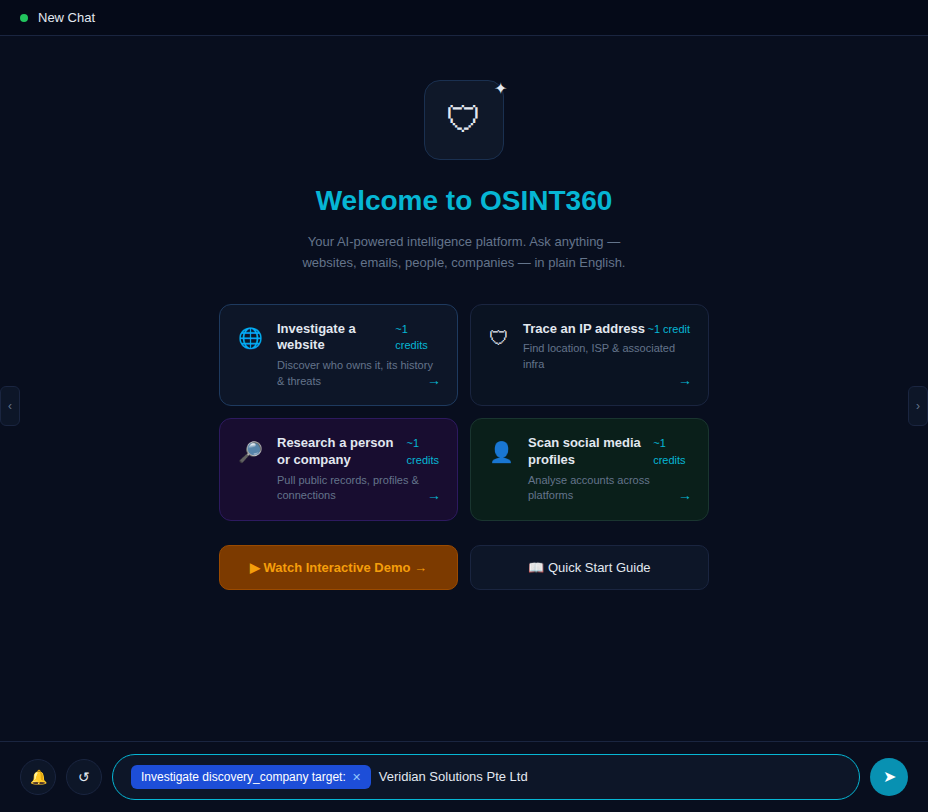
The input bar at the bottom activates with the tag:
```
Investigate discovery_company target: [Enter company name...]
```
## Step 2: Enter the Target Company Name
With `discovery_company` mode active, type the target company name into the input field.
**Input guidelines:**
| Format | Example | Recommended |
| -------------------- | ------------------------------ | ------------------- |
| Full legal name | `Veridian Solutions Pte Ltd` | ✅ Best |
| Short trading name | `Veridian Solutions` | ✅ Works |
| With suffix variants | `Veridian Solutions Pte. Ltd.` | ✅ Works |
| Abbreviated only | `VS Pte Ltd` | ⚠️ May miss results |
💡 **Tip:** Use the **full registered legal name** for Singapore-based entities. ACRA-registered names return the most complete records including registration numbers, incorporation dates, and previous names.
## Step 3: Initiate the Search
Press **Enter** or click the **Send** button (`➤`) to submit the query.
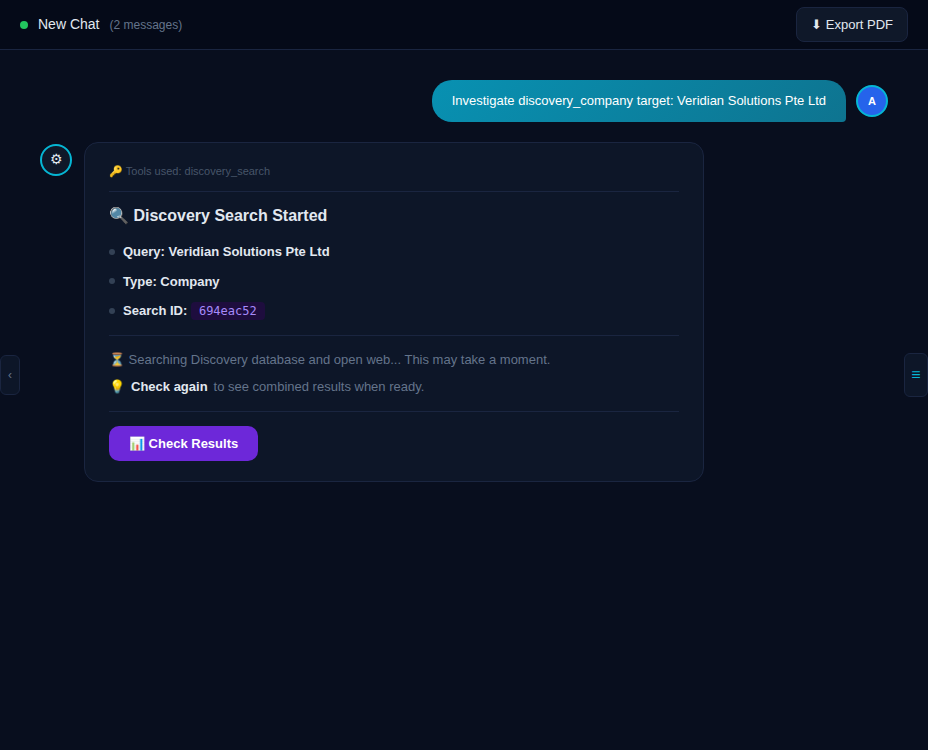
The platform displays your query as a chat message and immediately returns a **Discovery Search Started** confirmation card:
The confirmation card shows:
| Field | Example Value |
| ------------- | -------------------------------- |
| **Query** | `Veridian Solutions Pte Ltd` |
| **Type** | `Company` |
| **Search ID** | `694eac52` *(unique per search)* |
⏳ The system simultaneously searches the Discovery database and open web. This typically takes **10–30 seconds**.
Click **"Check Results"** when prompted to retrieve the latest findings.
## Step 4: Deeper Search — Automatic Fallback
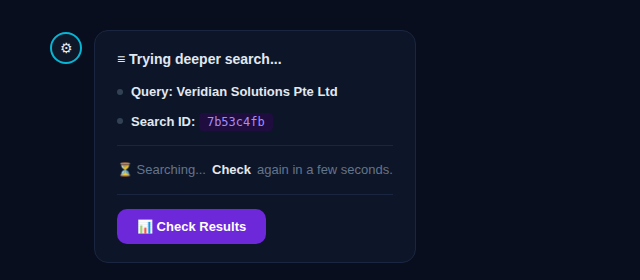
If the initial search returns limited results, OSINT360 automatically escalates to a **deeper search** pass:
The deeper search card shows:
```
≡ Trying deeper search...
- Query: Veridian Solutions Pte Ltd
- Search ID: 7b53c4fb
⏳ Searching... Check again in a few seconds.
[ 📊 Check Results ]
```
ℹ️ The deeper search uses an expanded set of data sources and alternative name variations. A new **Search ID** (`7b53c4fb`) is assigned for this pass. Click **"Check Results"** again after a few seconds to retrieve the combined findings from both passes.
## Step 5: Review Detailed Results
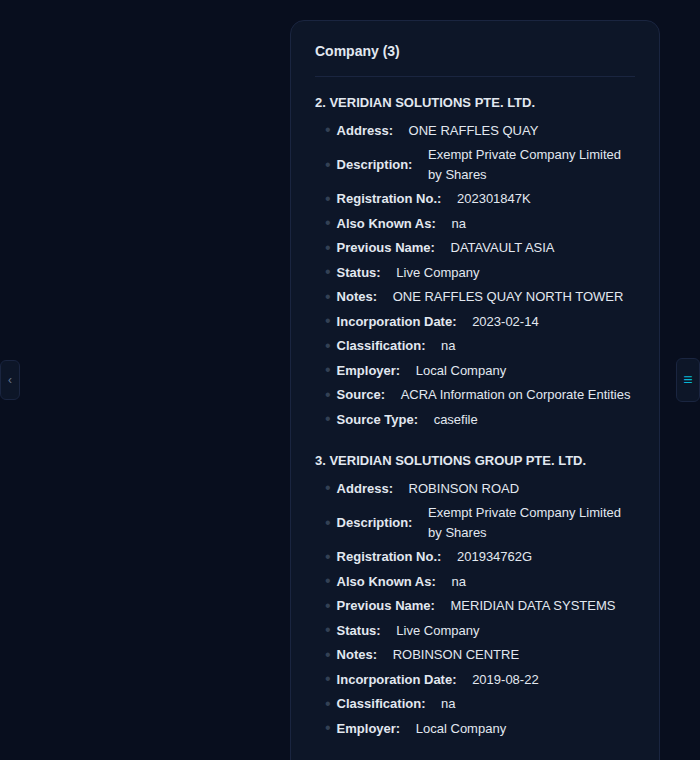
Once the search completes, OSINT360 returns a structured breakdown of all matched company records:
Each company record includes the following fields where available:
| Field | Description |
| ---------------------- | ------------------------------------------------------------------- |
| **Address** | Registered street address or business park location |
| **Description** | Legal company type (e.g., Exempt Private Company Limited by Shares) |
| **Registration No.** | Official government registration number (e.g., ACRA UEN) |
| **Also Known As** | Trade names or aliases on record |
| **Previous Name** | Former registered name before any change |
| **Status** | Corporate status (`Live Company`, `Struck Off`, `In Liquidation`) |
| **Notes** | Building name or additional address context |
| **Incorporation Date** | Date of official company registration |
| **Classification** | Industry classification code if available |
| **Employer** | Entity type (`Local Company`, `Foreign Company`, etc.) |
| **Source** | Dataset origin (e.g., `ACRA Information on Corporate Entities`) |
| **Source Type** | Data classification (`casefile`, `public_record`, `leak`) |
**Sample Results**
```
Company (3)
2. VERIDIAN SOLUTIONS PTE. LTD.
• Address: ONE RAFFLES QUAY
• Description: Exempt Private Company Limited by Shares
• Registration No.: 202301847K
• Also Known As: na
• Previous Name: DATAVAULT ASIA
• Status: Live Company
• Notes: ONE RAFFLES QUAY NORTH TOWER
• Incorporation Date: 2023-02-14
• Classification: na
• Employer: Local Company
• Source: ACRA Information on Corporate Entities
• Source Type: casefile
3. VERIDIAN SOLUTIONS GROUP PTE. LTD.
• Address: ROBINSON ROAD
• Description: Exempt Private Company Limited by Shares
• Registration No.: 201934762G
• Also Known As: na
• Previous Name: MERIDIAN DATA SYSTEMS
• Status: Live Company
• Notes: ROBINSON CENTRE
• Incorporation Date: 2019-08-22
• Classification: na
• Employer: Local Company
• Source: ACRA Information on Corporate Entities
• Source Type: casefile
```
## Step 6: Open Web Intelligence
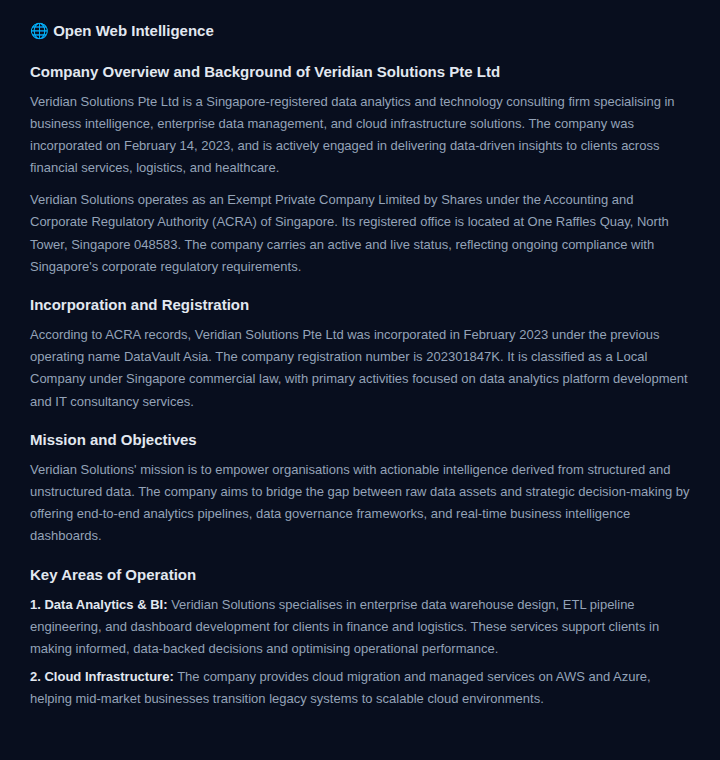
Alongside registry data, OSINT360 compiles **Open Web Intelligence** — an AI-synthesized profile of the company from public web sources:
This section provides:
* 📖 **Company Overview & Background** — Public-facing description and sector
* 🏛️ **Incorporation and Registration** — Legal structure, ACRA details, registered address
* 🎯 **Mission and Objectives** — Company-stated goals from public filings or website
* 🔑 **Key Areas of Operation** — Core business verticals and service lines
**Sample Open Web Intelligence**
```
🌐 Open Web Intelligence
Company Overview and Background of Veridian Solutions Pte Ltd
Veridian Solutions Pte Ltd is a Singapore-registered data analytics and
technology consulting firm specialising in business intelligence, enterprise
data management, and cloud infrastructure solutions. The company was
incorporated on February 14, 2023...
Incorporation and Registration
According to ACRA records, Veridian Solutions Pte Ltd was incorporated in
February 2023 under the previous operating name DataVault Asia. Registration
number: 202301847K. Registered office: One Raffles Quay, North Tower,
Singapore 048583...
Mission and Objectives
Veridian Solutions' mission is to empower organisations with actionable
intelligence derived from structured and unstructured data...
Key Areas of Operation
1. Data Analytics & BI: Enterprise data warehouse design, ETL pipelines,
and dashboard development for finance and logistics clients...
2. Cloud Infrastructure: AWS and Azure managed services for mid-market
enterprise cloud migrations...
```
⏱️ Open web data may take a few extra seconds to compile. If the section is not yet populated, click **"Check Again"** after a brief wait.
## Step 7: Analyze the Results Summary
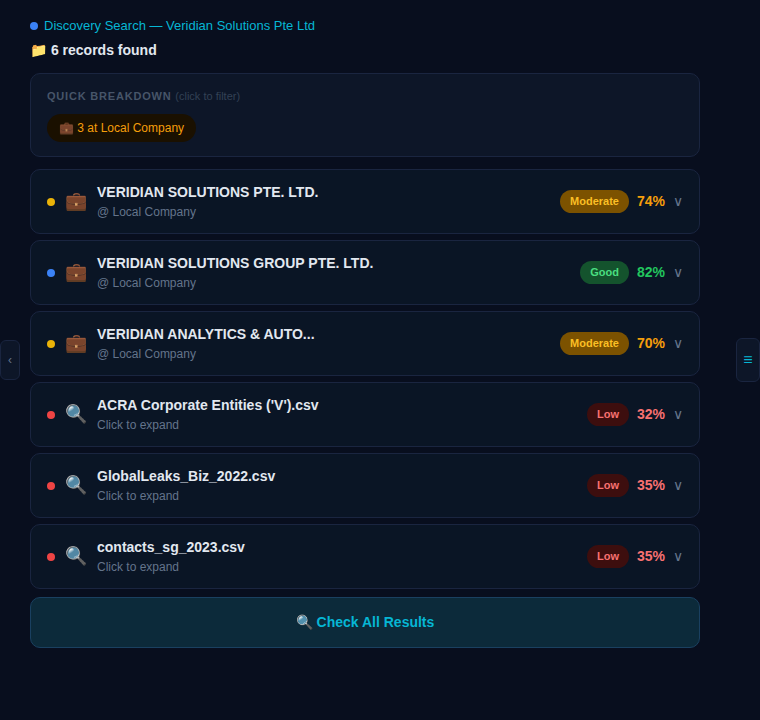
The results summary panel provides a high-level overview with confidence scores for each matched record:
**Result Overview**
```
🔍 Discovery Search — Veridian Solutions Pte Ltd
📁 6 records found
QUICK BREAKDOWN (click to filter)
💼 3 at Local Company
● 💼 VERIDIAN SOLUTIONS PTE. LTD. Moderate 74% ∨
@ Local Company
● 💼 VERIDIAN SOLUTIONS GROUP PTE. LTD. Good 82% ∨
@ Local Company
● 💼 VERIDIAN ANALYTICS & AUTO... Moderate 70% ∨
@ Local Company
● 🔍 ACRA Corporate Entities ('V').csv Low 32% ∨
Click to expand
● 🔍 GlobalLeaks_Biz_2022.csv Low 35% ∨
Click to expand
● 🔍 contacts_sg_2023.csv Low 35% ∨
Click to expand
[ 🔍 Check All Results ]
```
Quick Breakdown Filter
The **Quick Breakdown** chip (e.g., `💼 3 at Local Company`) lets you instantly filter results to only show local Singapore-registered entities. Click the chip to apply the filter without running a new search.
## Step 8: Review Web Sources
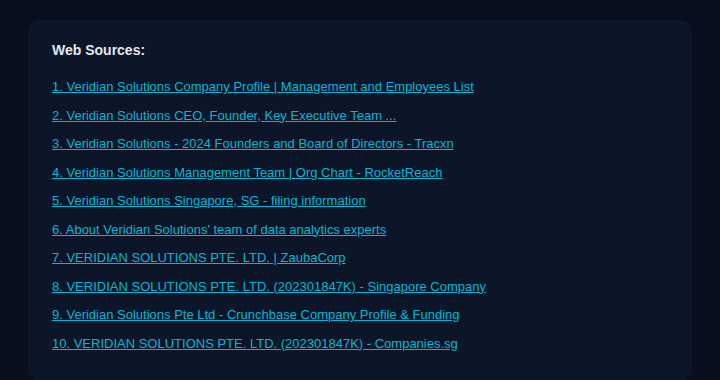
OSINT360 surfaces a curated **Web Sources** list of publicly accessible pages referencing the company:
```
Web Sources:
1. Veridian Solutions Company Profile | Management and Employees List
2. Veridian Solutions CEO, Founder, Key Executive Team ...
3. Veridian Solutions - 2024 Founders and Board of Directors - Tracxn
4. Veridian Solutions Management Team | Org Chart - RocketReach
5. Veridian Solutions Singapore, SG - filing information
6. About Veridian Solutions' team of data analytics experts
7. VERIDIAN SOLUTIONS PTE. LTD. | ZaubaCorp
8. VERIDIAN SOLUTIONS PTE. LTD. (202301847K) - Singapore Company
9. Veridian Solutions Pte Ltd - Crunchbase Company Profile & Funding
10. VERIDIAN SOLUTIONS PTE. LTD. (202301847K) - Companies.sg
```
💡 **Tip:** Click any source link to open the original web page. Sources from **Companies.sg**, **ZaubaCorp**, and **Crunchbase** are particularly useful for cross-referencing shareholder structure, director information, and funding history.
## Step 9: Run Additional Modules
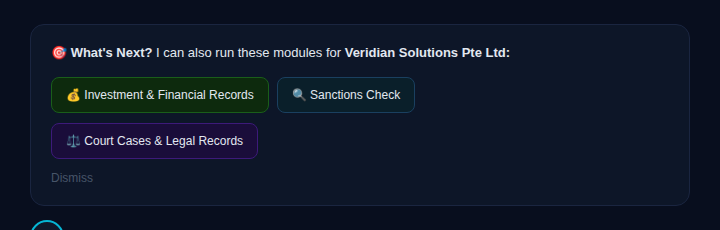
After the company search completes, OSINT360 surfaces a **"What's Next?"** panel with follow-up investigation modules tailored to the target company:
🎯 *"I can also run these modules for **Veridian Solutions Pte Ltd**:"*
**Available Follow-Up Modules**
| Module | What It Finds |
| ------------------------------------- | -------------------------------------------------------------------------- |
| 💰 **Investment & Financial Records** | Business investments, shareholdings, funding rounds, and financial filings |
| 🔍 **Sanctions Check** | OFAC, UN, EU, and Interpol watchlist screening for the entity |
| ⚖️ **Court Cases & Legal Records** | Civil, criminal, and public court filings linked to the company |
**How to Launch a Module**
1. Click any module button in the **"What's Next?"** panel
2. OSINT360 automatically runs the investigation against `Veridian Solutions Pte Ltd`
3. Results appear as a new message in the same chat thread
4. Each module costs approximately **\~1 credit**
💡 **Recommended workflow for due diligence:**
1. Start with **Investment & Financial Records** to map ownership and funding structure
2. Run **Sanctions Check** to screen against global watchlists
3. Run **Court Cases & Legal Records** to identify any active or historical litigation
🔄 Click **"Dismiss"** to close the panel. You can always re-launch modules by typing directly in the chat, e.g.:
```
run Sanctions Check for Veridian Solutions Pte Ltd
```
Understanding Result Scores
Each matched record carries a **confidence score** indicating how closely it matches the search query:
| Score Label | Range | Meaning |
| --------------- | --------- | ------------------------------------------------------------------------- |
| 🟢 **Good** | 80–100% | High confidence — name, registration data, and identifiers strongly match |
| 🟡 **Moderate** | 60–79% | Partial match — company name matches with fewer corroborating details |
| 🔴 **Low** | Below 60% | Weak match — found in a dataset but lacks direct registry confirmation |
Understanding Result Types
Company search results may appear in two distinct formats:
| Icon | Type | Description |
| ---- | ---------------------- | ------------------------------------------------------------------------------------------ |
| 💼 | **Company Record** | Matched from a corporate registry (e.g., ACRA). Includes full registration details. |
| 🔍 | **File / Dataset Hit** | The company name appeared in a leaked or public dataset file. Click to expand for details. |
**Tips & Best Practices**
🏢 Company Name Formatting
* Use the **full registered legal name** including the entity suffix (`Pte Ltd`, `Ltd`, `Inc`, `GmbH`, etc.)
* For Singapore companies: ACRA uses all-caps for registered names — the search is case-insensitive
* Omit punctuation variants — both `Pte Ltd` and `Pte. Ltd.` will return the same results
**🔗 Cross-Reference Strategy**
* Use **Registration No.** from results to verify identity across multiple sources
* Cross-check **Previous Name** fields to track corporate rebranding or restructuring
* Use **Web Sources** links to retrieve director lists, shareholder registers, and funding data
* Combine Company Search with **IBAN Number** or **LEI** lookups for financial entity profiling
**📊 Interpreting File Hits**
* CSV file results (Low confidence) may contain employee or contact data mentioning the company
* Open leaked file results with caution and only within authorized investigation contexts
* Use file source names (e.g., `ACRA Corporate Entities ('V').csv`) to gauge dataset relevance
🔒 **Privacy & Compliance**
* Only investigate companies you are legally authorized to research
* All searches are logged with your account for audit purposes
* OSINT360 aggregates only **publicly available and officially registered** corporate data
* Respect applicable regulations (PDPA, GDPR, local corporate privacy laws)
💾 **Export & Record-Keeping**
* Click **"Export PDF"** in the top-right corner to download a full report
* Use the **Search ID** (`694eac52`) to reference a specific search in follow-up queries
* Chat history auto-saves — revisit any previous investigation from the left sidebar
**Credits & Pricing**
| Action | Credit Cost |
| ---------------------------------- | ----------- |
| Company Search (basic) | \~1 credit |
| Deeper Search (automatic fallback) | Included |
| Investment & Financial Records | \~1 credit |
| Sanctions Check | \~1 credit |
| Court Cases & Legal Records | \~1 credit |
| Open Web Intelligence | Included |
| PDF Export | Free |
View current pricing via **Pricing** in the top navigation or visit the **Marketplace** for credit bundles.